CA French (Canada)
US English (US)
KR Korean
MX Spanish (Mexico)

Contact Us

If you still have questions or prefer to get help directly from an agent, please submit a request.
To find the contact information for your local office please visit:

Laerdal Customer Service
  • Contact Us
English (US)
CA French (Canada)
US English (US)
KR Korean
MX Spanish (Mexico)
  • Home
  • SimCapture Cloud Administrator and Faculty Help
  • SimCapture Cloud Getting Started
  • Enterprise and Enterprise with Exam System
  • Reporting

SimCapture Enterprise: Skills utilization reporting

Discover how SimCapture Enterprise can provide detailed reporting on skills utilization within your organization, allowing you to track and analyze employee development and performance more effectively.

Written by Jeri Ellis

Updated at May 11th, 2026

Contact Us

If you still have questions or prefer to get help directly from an agent, please submit a request.
To find the contact information for your local office please visit:

Laerdal Customer Service

Table of Contents

Accessing the Skills Utilization Report What the Report Shows Session Types Filtering and Viewing Options Detailed Table View Interpreting the Data
  • SimCapture Cloud Release Notes
    Release Notes Archive
  • SimCapture Cloud Administrator and Faculty Help
    SimCapture Cloud Getting Started SimCapture Cloud Tutorials SimCapture Cloud Troubleshooting
  • SimCapture Cloud Learner Help
  • SimCapture On-Premise Help
    SimCapture On-Premise Release Notes SimCapture On-Premise Migration tool SimCapture On-Premise Enterprise SimCapture On-Premise Pro SimCapture On-Premise Enterprise with Exam System SimCapture On-Premise Use Cases SimCapture On-Premise Getting Started
  • SimCapture for Skills Help
    SimCapture for Skills Administration Documentation SimCapture for Skills Student Documentation SimCapture for Skills Use Cases SimCapture for Skills Tutorial Videos
  • SimCapture Mobile Camera App
  • SimCapture Companion Apps Help
  • SimCapture Integrations Help
  • Samaritan AI Help
    Evaluation Builder Session Video Transcription
  • SimCapture Cloud Use Cases
    Enterprise Cloud Use Cases Pro Cloud Use Cases
  • Hardware and Network Technical Information Help
  • Glossary
+ More

The Skills Utilization Report helps administrative users understand how learners engage with different types of practice sessions in SimCapture. It provides insight into usage patterns, participation levels, and practice behaviors , supporting data‑informed decisions about training design and learner engagement.

Accessing the Skills Utilization Report

To open the report:

  1. Select Reports from the global navigation bar
  2. Choose SimCapture for Skills

What the Report Shows

Session Breakdown

The report displays the number and types of sessions learners have completed, making it easy to compare engagement across different practice formats.

Session Types

Session data is grouped as follows:

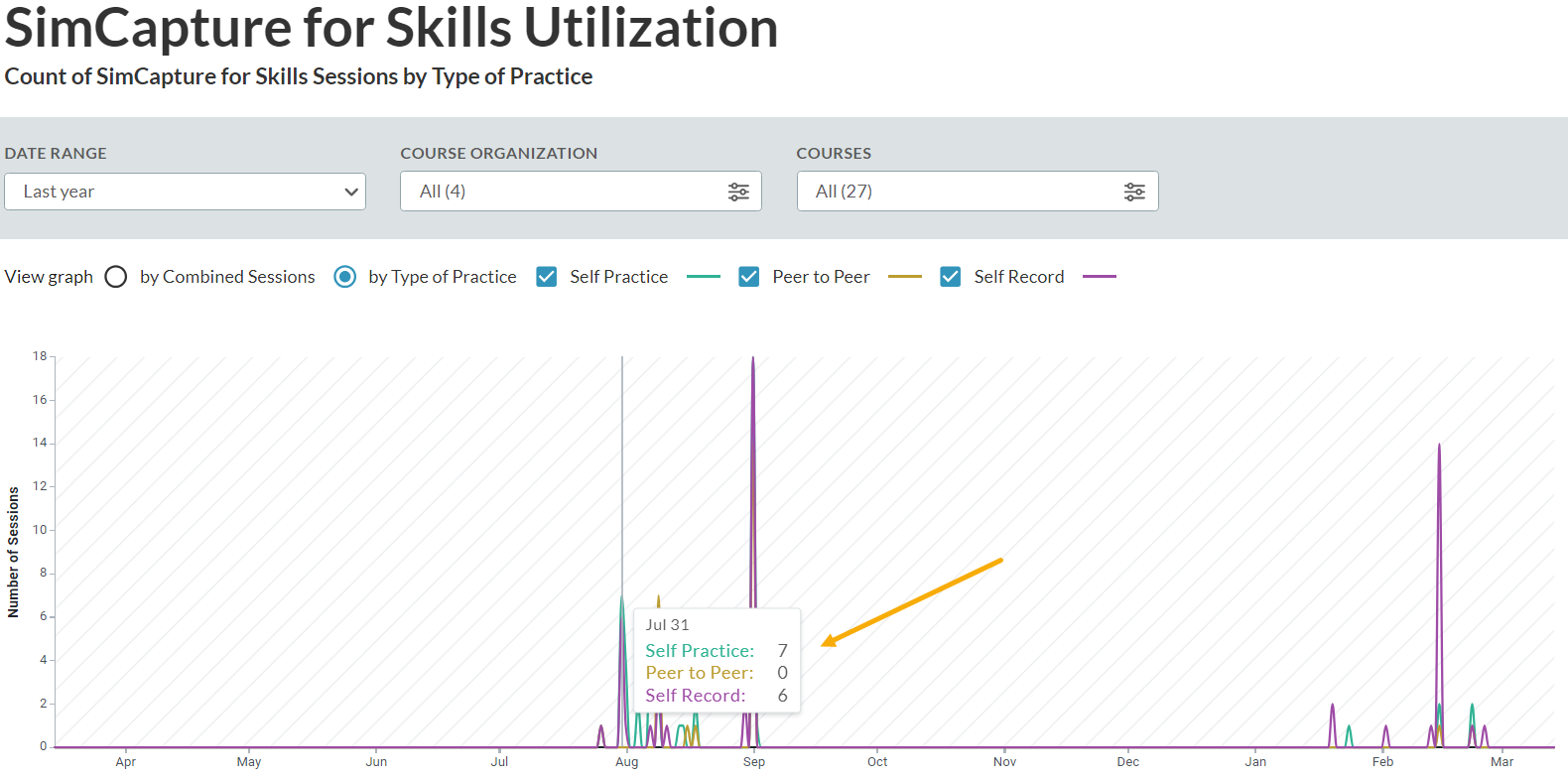
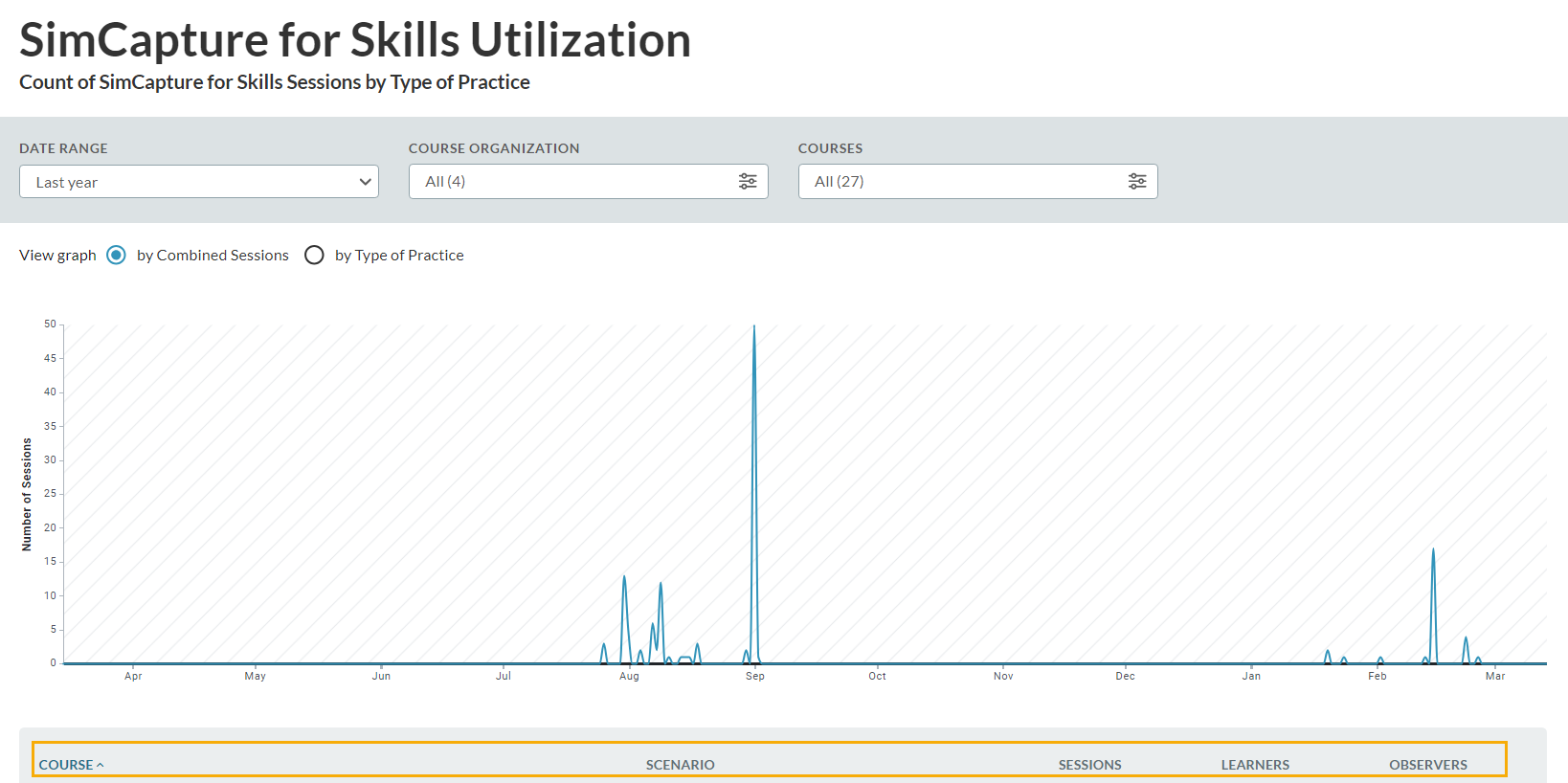
Combined Sessions 
Includes all session types in a single summary view

Type of Practice 
Breaks sessions down by format:

  • Peer‑to‑Peer (green)
  • Self‑Practice (gold)
  • Self‑Record (purple)

This breakdown helps identify how learners are choosing to practice.

1710429846976-Release2

Filtering and Viewing Options

Filters

You can refine the report using:

  • Date range
  • Course organization
  • Course

All visualizations and tables update dynamically based on your selections.

Interactive Graph

The line graph shows session trends over time by session type. 
Hover over the graph to view session counts for individual dates or formats.

Detailed Table View

Below the graph, a table provides a detailed breakdown by course and scenario, including:

  • Course
  • Scenario
  • Sessions: Total number of sessions completed
  • Learners: Number of distinct learners
  • Observers: Number of distinct observers

This table updates automatically as filters are applied.

1710429987298-Release2

Interpreting the Data

The Skills Utilization Report highlights both participation volume and engagement patterns .

For example:

If one learner completes 10 sessions with 10 different observers , the report shows:

  • Sessions: 10
  • Learners: 1
  • Observers: 10

If 10 learners each complete one session with 10 different observers , the report shows:

  • Sessions: 10
  • Learners: 10
  • Observers: 10

These comparisons help determine whether activity reflects:

  • Repeated practice by a smaller group (deeper engagement), or
  • Single participation by many learners (broader exposure)

A higher number of sessions relative to learners and observers often indicates repeated practice , which may suggest stronger skill reinforcement and engagement.

skills utilization report simcapture cloud enterprise admin users session types peer-to-peer self-record self-learning reports global navigation bar simcapture for skills session breakdown combined sessions type of practice self-practice interactive graph session counts detailed table course scenario learners observers filtering options date range course organization courses

Was this article helpful?

Yes
No
Give feedback about this article

Related Articles

  • SimCapture Enterprise with Exam System: The Control Interface
  • Using the Reporting Dashboard in SimCapture
  • SimCapture Enterprise with Exam System: Exam system overview
  • Understanding the Learner Experience: Released Scores in SimCapture

Country and Language selector

Americas

  • América Latina (Español)
  • Brasil
  • Canada
  • USA

Asia / Pacific

  • Australia
  • China - 简体中文
  • Hong Kong
  • India
  • Japan - 日本
  • Korea - 한국어
  • Malaysia
  • New Zealand
  • Singapore (English)

Europe

  • België (Nederlands)
  • Belgique (Français)
  • Danmark
  • Deutschland
  • España
  • France
  • Italia
  • Nederland
  • Norge
  • Österreich
  • Polska
  • Schweiz
  • Suomi
  • Sverige
  • United Kingdom

Location not listed?

  • International (English)
Top
  • Products

    • Simulation & Training
    • Skills Proficiency
    • Courses & Learning
    • Medical Devices
  • Services

    • Educational Services
    • Technical Services
    • Resuscitation Quality Improvement
    • NESTLED
  • Insights

    • Events
    • SUN
  • Support

    • Contact Us
    • Customer Service
    • Product Catalogue
    • Product Downloads
    • Product Support & FAQs
  • About Us

    • One Million Lives - Our shared goal for 2030
    • Impact Update - Laerdal report on sustainability
    • Working at Laerdal
    • Our Partners
  • Facebook
  • Twitter
  • YouTube
  • Privacy Policy
  • Terms of Use
  • Sitemap
  • Whistleblower Channel
Copyright © 2022 Laerdal Medical. All Rights Reserved.

Knowledge Base Software powered by Helpjuice

Definition by Author

0
0
Expand